🖌️ Painting from scratch: Arisu
Arisu
Arisu1 is a project I created for Professor Fahim Khan’s graduate CSC 572 class for Fall 2025 at Cal Poly.
The assignment was to implement a novel somewhat state-of-the-art paper into a program.
I encountered the Ciallo2 paper and implementation and liked the idea of a paint program powered entirely by compute shaders.
I also did some research and discovered that most paint programs rarely if all at all use the GPU, which solidified my decision to make this project.
What is it?
Arisu is a paint program. Think MS Paint. Just something to open up and appreciate the simple style of before we moved to boring basic WinUI, Qt, GTK, Electron apps.
I mention all of those GUI toolkits because I made the decision to implement this with one major rule in mind. ZERO DEPENDENCIES. I go in depth about this in the ‘How it works’ section.
Show, don’t tell
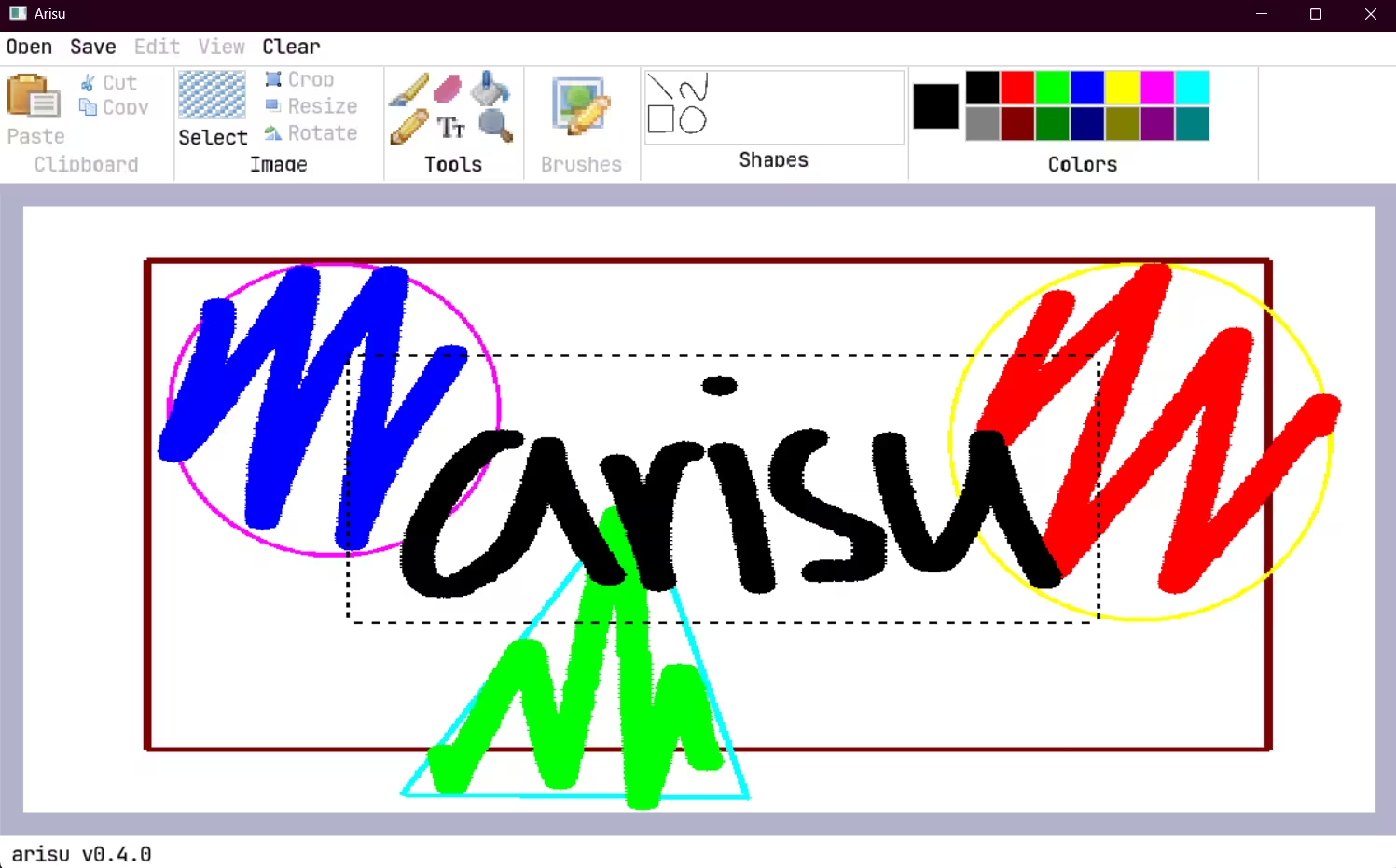
This is a screenshot of Arisu 0.4.0, running on Windows 11. Pretty much every feature you see there that isn’t grayed out is implemented and usable.
- Basic brush, pencil, eraser are implemented.
- Color picker
- Selection box
- Basic shape tools (rectangle, ellipse, line)
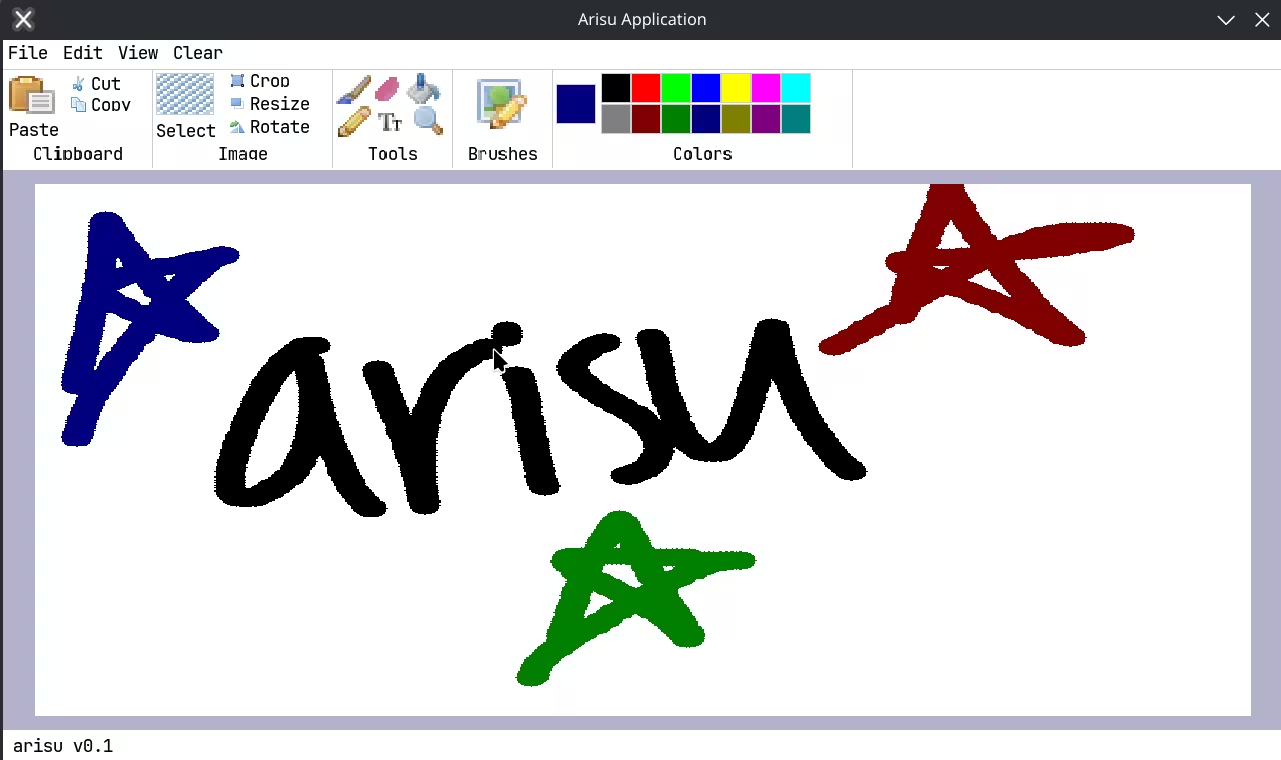
If you’re curious, here’s a screenshot of 0.1.0 on Linux, although it’s not too different.
How can I get it?
Since it’s written in LuaJIT, it won’t natively compile to a binary, but I do have plans to distribute it as a binary later on with my own solution which will statically link LuaJIT for you. It’s pretty promising, only ~2MB, of which ~1MB is Rust’s dependencies, ~1MB is LuaJIT itself. Arisu is tiny!
For now, you can use these instructions. It’s really easy, I promise!
- Set up LuaJIT on your system
- Windows:
winget install -e --id DEVCOM.LuaJIT - Linux:
dnf install luajitorapt install luajit
- Windows:
- Clone the repository
git clone https://github.com/codebycruz/arisu
- Run this inside the repo folder
luajit ./src/main.lua
How it works
Arisu is written in LuaJIT and OpenGL. It uses compute shaders to render brush strokes to a framebuffer texture which is then displayed to the screen.
From scratch: X11
As I use Linux on my machine, I first created the version of Arisu with X11 as the windowing system.
The windowing system is the core part of writing an application from scratch, you need a way to allocate a window to create an OpenGL context to it, and get window events like key presses. That’s what X11 provides on Linux.
What about Wayland?
Linux is moving on to Wayland as its primary windowing system, but it supports X11 apis completely via XWayland. Making an application for Wayland natively is much more complicated, and would have less support. It can be considered for future work.
From scratch: Win32
After 0.2.0 and demoing to the professor, he said he’d be willing to try it on Linux but having Windows or MacOS support would be ideal.
So I took on the task of porting this to Windows. With the way I created everything through layers of modular abstractions, it was relatively easy.
All that needed to be done was creating OpenGL bindings on windows which is uniquely a pain as you cannot access non-core OpenGL functions until you create an OpenGL context, and creating bindings to the Win32 APIs to create a window and event loop, implementing the same api as my X11 implementation.
It took a few hours of research and work but I was able to get it working for 0.3.0.
From scratch: LuaJIT
Another curveball decision was that I would use Lua / LuaJIT as the main programming language.
Lua3 is a lightweight programming language created in 1993 in Brazil. It’s used because its so simple and small. It was used before Python became widely popular, even the popular PyTorch library was preceded by the Torch library which used LuaJIT.
LuaJIT is an implementation of a lua interpreter that uses JIT compilation. To make a long story short, it compiles your code to machine code on the fly so it runs faster.
It also comes with an ffi library which lets you call C functions and pass C structs and functions to C. For example:
local ffi = require("ffi")

ffi.cdef[[
    void glClearColor(float red, float green, float blue, float alpha);
    void glClear(unsigned int mask);
]]

local gl = ffi.load("GL")
This is how simple it is to call OpenGL functions from LuaJIT on Linux (it’s more complicated on Windows). It basically does stuff like dlopen and dlsym for you with a nice C syntax.
I chose LuaJIT after originally choosing Rust because I knew Rust’s memory safety features would get in the way of what I wanted to do with creating something very low level and from scratch.
From scratch: Images
To support icons at all, I needed to create an image loader. I chose to support two types of images, PPM4 and QOI5. QOI is the primarily used format as it supports alpha unlike PPM and is more widely supported.

Some icons rendered in Arisu.
It works perfectly, and the QOI decoder is tiny, about ~100 lines of Lua. The icons may seem low quality but that’s just the specific icons I chose to use to fit the MS Paint / retro aesthetic. It’s a common pattern you’ll see throughout Arisu, but don’t be fooled - the UI library is a beast and I could easily create a cutting edge UI if I wanted to.
From scratch: UI library
I didn’t just want to create a super coupled single paint program. I carefully made layers of abstraction without any coupling, from the cross platform windowing library, then an asynchronous event loop above that which allows patterns that work across X11 and Win32, to a UI library that hides the event loop entirely.
I went for a design inspired by the Rust UI library, Iced6, which is inspired by Elm. It uses a declarative style of UI programming where you define the UI as a tree of elements, and the library handles rendering and event handling.
Here’s an example.
local Element = require("ui.element")
local Arisu = require("arisu")
local RenderPlugin = require("plugins.render")

---@class App
---@field render plugins.Render
local App = {}
App.__index = App

function App.new()
	return setmetatable({
		render = RenderPlugin.new(),
	}, App)
end

---@param window Window
function App:view(window)
	return Element.new("div")
		:withStyle({
			width = { rel = 1.0 },
			height = { rel = 1.0 },
			direction = "column",
			gap = 5,
		})
		:withChildren({
			-- Add children here
		})
end

function App:update(message)
end

-- This is more for internal usage. It allows for direct access to windowing events
function App:event(event, handler)
	return self.render:event(event, handler)
end

Arisu.run(App)
It’s a lower level version as Iced doesn’t allow you to directly take windowing events. So I took a bit of inspiration from making my previous project(s) Qun7 and Qun-rs8 heavily modular sort of like Bevy.
There’s a lot that goes on in a UI library, it has to lay the whole ui out and calculate positions from the styling, handle events and push them around, manage textures and render the whole thing to OpenGL.
This is why I separate everything into “plugins”. You can technically write your own render stack entirely.
From scratch: Text rendering
Text rendering is possibly one of the most complicated parts of writing a UI renderer from scratch.
Usually people leave it up to libraries like FreeType9, or go a little lower level with HarfBuzz10. But of course my rule for this project was zero dependencies.
- Glyph rendering is probably the most complex method of text rendering but provides the best quality.
- Signed Distance Fields (SDF) is a method of rendering text that uses a distance field texture to render glyphs. It is less complex than glyph rendering but still requires a lot of work to generate the distance field textures.
- Bitmap fonts are the simplest method of text rendering. It uses a texture atlas of pre-rendered glyphs and renders them as quads.
I went with bitmap fonts / a text atlas as it is quite simple to implement and could even reuse my existing pipeline for rendering quads (and I even have it reuse the element pipeline.. text is just an array of divs..)
Of course it’s nowhere near perfect. I only have a single sized font which is 16px tall.

This is a screenshot of the text rendering in Arisu.
The two biggest issues with this is that
- Since it’s a single size, it looks worse at other scales
- Vertical characters like ‘q’ or ‘p’ get cut off
Bonus: Sound
I didn’t get to doing this for Win32, but I implemented playing sounds via ALSA11 on Linux.
You might not believe me, but it was pretty simple, arguably simpler than images.
I just had to make a WAV decoder, which was hardly any “decoding” as the format just stores raw PCM data with a header. Then you pass that to libasound which the Linux kernel provides via ALSA.
Demo
Arisu running on my laptop running Fedora Linux.
It’s pretty smooth. I recommend trying it out yourself!
Best part is that it is intentionally designed so it doesn’t do any layout calculations or even redraws unless absolutely necessary. So it uses practically no CPU time.
Future work
There’s a lot of features that are grayed out currently. Biggest thing is I want to implement is a file dialog. Normally people leave the work to libraries like GTK or WinUI, but as briefly discussed, this has zero dependencies, so I’ll have to make the UI on my own.
MacOS support is the last operating system that isn’t supported. I don’t have a Mac, so I can’t promise it’ll happen, but I’m not entirely against it.
Footnotes
-
Arisu is the Japanese pronunciation of “Alice” which I picked as it characterizes the program well and matches the Ciallo inspiration paper’s name. ↩
-
Ciallo: GPU-Accelerated Rendering of Vector Brush Strokes (https://doi.org/10.1145/3641519.3657418) ↩
-
Lua Programming Language (https://www.lua.org/) ↩
-
PPM Image Format (http://netpbm.sourceforge.net/doc/ppm.html) ↩
-
Quite OK Image Format (https://qoiformat.org/) ↩
-
Iced UI Library (https://iced.rs/) ↩
-
Qun, a heavily modular, ECS based game engine in C++ I also made for professor Fahim Khan last quarter for CSC 471: https://github.com/codebycruz/qun ↩
-
Qun-rs, a second iteration of Qun, except in Rust and even more modular: https://github.com/codebycruz/qun-rs ↩
-
FreeType Font Engine (https://www.freetype.org/) ↩
-
HarfBuzz Text Shaping Engine (https://harfbuzz.github.io/) ↩
-
ALSA Sound System (https://www.alsa-project.org/) ↩